Start with the six details every downtown order needs
A complete detail set prevents almost every common downtown catering issue. When teams book downtown Toronto office catering, the orders that go wrong rarely fail on the food. They fail on a missing floor number, a receiver who stepped out, or a lunch timed to the meeting instead of the room.
Before you contact any kitchen, put these six items in one planning note:
- Headcount range and attendance risk. Give a band (for example 22 to 26) and say whether attendance is fixed or drifts.
- Dietary and allergy notes, consolidated in one place, not scattered across a Slack thread.
- Delivery address with floor, suite, entrance, and handoff instructions.
- Target service time, meaning when food must be on the table, not just when the driver should arrive.
- Budget range and preferred format: shared trays, buffet setup, or boxed meals.
- A single owner for day-of communication, with a backup phone.
Good catering outcomes come from better pre-order details, not just better dish selection. For downtown orders with more than one constraint, direct coordination with the kitchen outperforms app-only workflows because the person reading your notes can actually ask a question before cooking starts. It also makes recurring lunches faster: once the kitchen has your building details and dietary categories, the second order is a two-line message.
Keep this note as a template. Office managers usually optimize for budget and speed, executive assistants for timing precision, and HR teams for inclusivity. The same six-item template works for all three roles. Only one variable changes: budget depth, service style, or timing tolerance.
Choose the delivery path before you choose dishes
The delivery path decides how much logistics detail you owe the kitchen, so settle it first. Evergreen Thai offers three ways to get group food into a downtown office, and each fits a different order size. The delivery options page lays out the full set, but the short version is:
- Pickup at 175 Dundas St W. Best for small orders, 6 to 10 people, when someone on the team is already near University Ave, St Patrick station, City Hall, or the Eaton Centre. No building access details needed.
- Direct group delivery. Available for orders over CAD 200 within 5 km of 175 Dundas St W, which covers the Financial District, the hospital row on University Ave, TMU, UofT, King West, and most of the core. This is the path where delivery notes matter most.
- Catering quote path. For 10 or more guests, or any order with buffet setup, mixed dietary requirements, or a hard room-ready time, use the quote form so the kitchen can plan trays, timing, and handoff together.
Third-party apps (Uber Eats, DoorDash, Fantuan) still work for a quick lunch, but their checkout notes are short and drivers have no way to confirm details. Use them for individual orders, not for a boardroom.
Format matters too. Shared party trays suit most 10 to 40 person lunches because they travel hot and set up in minutes. Buffet-style setups work for larger training rooms and all-hands days. Boxed or individual meals are available on request and make sense when people eat at their desks or when several strict dietary needs must be kept separate. Decide this before the dish list, because tray format changes how much table space and how many serving utensils you need.
Write delivery notes a driver can act on
A complete delivery note prevents most downtown handoff problems before they happen. Downtown catering is an operations challenge first: lobby security, concierge sign-in, elevator wait times, limited loading access, and a narrow lunch window around 11:45 a.m. to 1:00 p.m. all compete for the same 20 minutes. Your note is the only tool the driver has for solving them.
Include, in this order:
- Street address plus the building or tower name (many Bay Street addresses share a lobby with a different name on the door)
- Floor and suite number, and the company name on the door
- Which entrance to use: front lobby, loading dock, or a specific PATH-level or side entrance
- Whether the concierge needs advance registration and under whose name
- The receiver’s name and mobile number, plus a backup who will be at their desk
- Where the handoff happens: lobby, reception, or the meeting room
- The room-ready time and the meeting start time, both
Most drop-off delays come from process gaps, not kitchen timing. The four failure modes that repeat most often are a missing suite or floor, a contact who is unreachable when the driver arrives, a setup table that is not cleared, and dietary requests split across several messages. Treat these as operating risks and check each one off before you submit.
One practical test: read the note as if you were a driver who has never been in the building. If any line makes you guess, fix it.
Plan tower, loading dock, and PATH access
Building access is the variable that separates downtown catering from suburban catering, and it deserves its own line on the checklist. The route from 175 Dundas St W to most core addresses is short, which keeps timing predictable, but the last 100 metres inside the building is where the buffer gets used.
Financial District towers
Financial District office buildings almost always route deliveries through a concierge desk or a dedicated loading dock, and many require the receiver to be registered in advance. Ask your building manager three questions: does the driver need to be on a list, is there a service elevator with restricted hours, and can the driver be escorted upstairs or must the handoff happen in the lobby. The Financial District catering guide has tower-by-tower notes for TD Centre, First Canadian Place, Scotia Plaza, Commerce Court, Brookfield Place, Bay Adelaide Centre, and Royal Bank Plaza.
PATH-connected buildings
PATH-connected delivery planning needs exact handoff instructions and a realistic buffer. Drivers generally cannot use the underground concourse for catering carts, so the note must give the street-level entrance and the elevator route, not the PATH address. Add 15 to 20 minutes for security and elevators. Teams near Union Station and the South Core can use the PATH and Union Station lunch catering guide for building-specific details.
Campus, hospital, condo, and City Hall
Campus buildings at TMU and UofT often have no concierge at all, so the receiver must physically meet the driver at a named door. Hospital and clinic buildings on University Ave usually need the department name and a staff contact who can clear security. Condo party rooms need a concierge notice and a fob-holder to open the room. City Hall and nearby government offices need the department and a named receiver. Teams working around Nathan Phillips Square, the Eaton Centre, and downtown Yonge are a few blocks from the kitchen, so pickup is often the simplest path.
For any of these, put the answer to “who opens the door” in the delivery note.
Time the order to room readiness, not the lunch hour
Boardroom lunch catering should be timed to room readiness, not the nominal lunch hour. A 12:00 meeting with food arriving at 12:00 means executives watching trays being unpacked. A 12:00 meeting with food on the table at 11:45 means the room is ready when they walk in.
Work backwards from the moment plates need to be full:
- Room-ready time: when trays must be open and labeled on the table
- Handoff time: room-ready time minus 10 minutes for unpacking and setup
- Building arrival time: handoff time minus 15 to 20 minutes for lobby, security, and elevators
- Order deadline: ideally the day before for 10 to 40 guests, earlier for larger or buffet setups
Give the kitchen the room-ready time and let them plan the rest. A kitchen on Dundas West near University Ave has a short route to Bay Street, King Street, Front Street, and the hospital row, which is exactly what makes a tight window workable.
The day before, reconfirm the receiver and backup phone, and clear the setup surface. On the day, keep one owner watching the phone from 20 minutes before arrival. For a boardroom-specific run-through, including what to do when the meeting overruns, use the guide on coordinating catering for a boardroom lunch.
Different scenarios stress different parts of the timeline. A boardroom needs exact room-ready timing and a clean shared setup. A team workshop needs easy self-serve flow and portion stability across a longer window. A hybrid anchor day needs mixed preferences and a fast reset between sessions. A campus or condo event needs handoff clarity above everything else. Pick the scenario, then tighten the matching line of the checklist.
Collect dietary preferences before you pick dishes
Most dietary mistakes in group catering happen before food is selected, when information is incomplete, vague, or collected too late. A short intake workflow fixes this without turning lunch into a project.
Use one recurring form or message template for every team lunch, with a hard RSVP cutoff before quantities are finalized. Ask for exact exclusions, not labels, because three people who write “vegetarian” may mean three different things. Collect:
- Dietary type: vegetarian (egg okay or no egg), vegan, no fish sauce or oyster sauce, dairy-free, gluten-aware, no onion or garlic
- Allergy or intolerance notes, with severity where relevant
- Spice tolerance (mild, medium, Thai hot)
- Anything the person needs kept physically separate
Then group the responses into a few practical categories rather than a list of individual custom orders. “6 vegetarian, 2 of them no egg, 1 peanut allergy, mostly mild” is a note the kitchen can cook from. “Some allergies, a few vegetarians” is not.
Send the whole list in a single message with the order. Do not rely on verbal summaries passed between people, and do not split dietary notes across several emails. If your team includes vegan guests, say so at order time: Evergreen Thai’s kitchen uses fish sauce and oyster sauce in standard recipes, and vegan and vegetarian versions of noodle, curry, and rice dishes are prepared on request. The kitchen is shared, so ask when ordering rather than expecting a certified allergen-free guarantee.
Turn preferences into a tray plan
Dietary notes are only useful once they become tray roles. The reliable structure for a mixed office is three layers, not a pile of special requests:
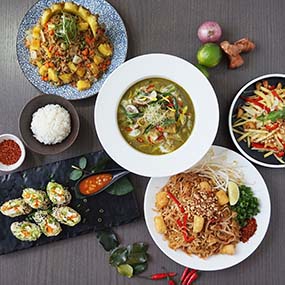
- Anchor trays: substantial vegetarian mains with real volume, such as Vegetable Pad Thai, Mixed Vegetable Curry, Tofu Basil, or Vegetable Fried Rice
- Bridge trays: dishes both vegetarian and non-vegetarian guests reach for, such as Spring Rolls, Golden Tofu, Mango Salad, and jasmine rice
- Broad-appeal mains for the rest of the table: Pad Thai, Cashew Chicken, Green Curry, Chicken Satay, Pad See Ew
The most common mistake is treating vegetarian dishes as symbolic add-ons sized to the strict vegetarian headcount. In practice, meat eaters share vegetarian trays freely, so size vegetarian volume for crossover demand. A group of 24 with 6 vegetarians usually needs vegetarian mains for 9 or 10 people. The mixed dietary preferences guide covers the half-vegetarian, half-chicken ratios in detail.
Ask for labels on every tray with the dish name and a short ingredient note (contains egg, contains peanuts, vegan on request). Labels cut the questions at the table and let guests build a plate without asking who ordered.
Set the budget early and prioritize core mains first. Add supporting dishes only after coverage and quantity are sufficient. For tray counts per 10, 20, 30, or 50 guests, use the guest count and budget guide before you finalize.
Run a two-minute debrief after every order
A short post-event review is what turns one good lunch into a repeatable process. Capture four things while the trays are still on the table:
- On-time room readiness: was food on the table at the room-ready time, not just at the curb?
- Dietary fit: did every guest with a stated need find a labeled option, and did anyone have to ask?
- Leftover ratio versus attendance: which trays ran out first and which came back half full?
- Labeling and serving flow: did the queue move, and were utensils and plates where they needed to be?
For recurring orders, these become the metrics office admins actually use: in-room readiness rate, hot-handoff quality from team feedback, dietary incident rate, and the reorder cycle for similar events. Two or three debriefs give you a quantity baseline that makes the next order faster and cheaper than guessing.
Store the debrief with the delivery note and the dietary list. For a monthly team lunch, that file is the whole checklist: update the headcount, resend the notes, done.
Why a kitchen on Dundas West makes the checklist easier
A short delivery route shrinks every risk on this list. Evergreen Thai Kitchen & Bar cooks at 175 Dundas St W, near University Ave and steps from St Patrick station, City Hall, the Eaton Centre, the AGO, TMU, UofT, and the hospital row. Bay Street, King Street, Front Street, and Union Station are all inside the 5 km direct group delivery radius, so trays leave the wok and reach a boardroom while the curry is still steaming and the Spring Rolls are still crisp.
The kitchen has been operating downtown since 2007, which means the concierge desks, loading docks, and elevator quirks of the core are familiar territory. Party trays, buffet-style setups, and boxed meals on request cover groups from 10 to 500 or more, and vegetarian, vegan, dairy-free, gluten-aware, and no-onion-no-garlic versions are available when you ask at order time. Thai curries here are made with coconut milk, not dairy.
Fill in the six details from the first section, pick your delivery path, and send the note to the kitchen. You can get a catering quote online, or call +1 416-581-8668 to walk through building access and timing with someone who has delivered to your tower before.